Words in Color
Second Gear GamesWord
4.425.00 Reviews
- Version
- 1.0.4
- Installs
- 50.00K
- Age Rating
- Everyone
Screenshots
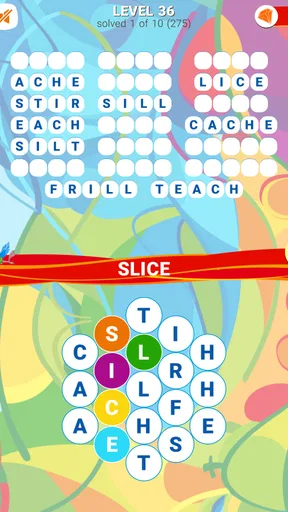
Our Review of Words in Color
 Analysis by Appyee
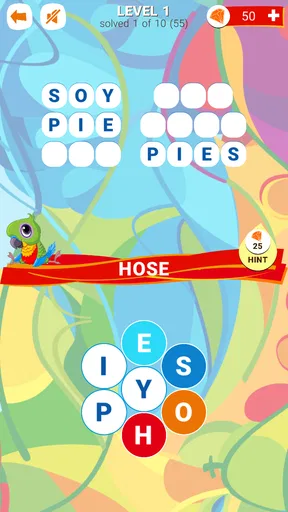
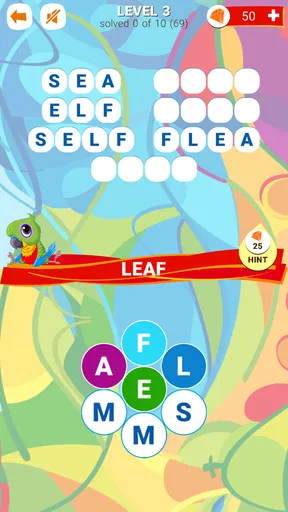
I found Words in Color most interesting as a quiet, focused word game rather than a large all-purpose puzzle collection. It comes from Second Gear Games, is free to start, and is aimed at Everyone. The basic idea is easy to understand: connect letters, look for words, and use the color-based presentation to keep track of the puzzle. That simplicity makes it approachable, but it also means the experience depends heavily on how comfortable you are with reading, spelling, touch controls, and visual information.
I spent time looking at it from that practical angle because a word game can be technically simple while still being awkward for some players. A person who wants a short mental break may enjoy it immediately, while someone needing strong customization, spoken guidance, or a very flexible interface may find the experience less suitable. My overall impression is positive, but it is a more specific recommendation than “everyone who likes word games will love it.”
How the puzzle presentation affects readability and navigation
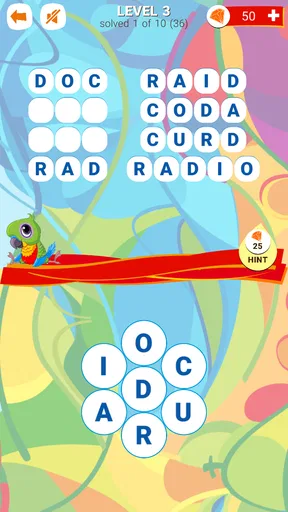
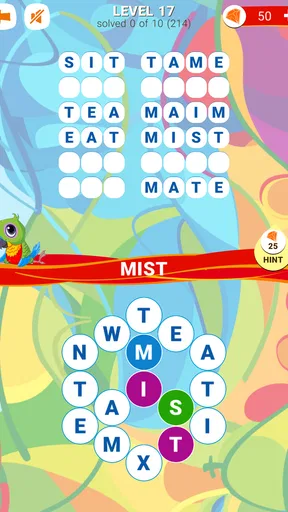
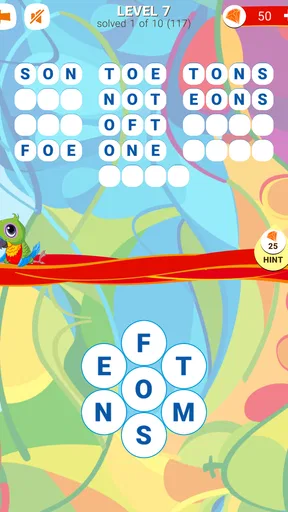
The color-centered design gives the game its identity. Instead of presenting a plain list of clues or a traditional crossword layout, it asks me to work with letters as visual pieces and connect them into words. That creates a more playful first impression than a standard dictionary quiz. The central task is understandable quickly, which matters for players who do not want a long tutorial before starting.
For a new player, the best way to approach each puzzle is to resist tapping randomly. I first scan the available letters for short, familiar words, then use those discoveries to understand the longer possibilities. This is especially useful when the board feels visually busy. Finding a few obvious combinations gives the puzzle structure and reduces the feeling that every letter is competing for attention.
The color treatment can help separate elements at a glance, but color is also where individual experiences may differ. A player with strong color perception may find the presentation lively and easy to follow. Someone with color-vision differences should not assume that the colors alone will always communicate every distinction clearly. In practice, I would pay attention to whether the letters, positions, and connection paths remain understandable without relying on hue as the only clue.
Navigation is at its best when I am already familiar with the basic interaction. The game does not present itself as a complicated system, so there are fewer menus and concepts to learn than in a large word-game platform. That can be a real advantage for older players or anyone who becomes frustrated by crowded interfaces. It also makes the game suitable for a quick handoff to a family member who has not played it before.
There is a useful difference between visual simplicity and visual comfort. A clean puzzle can still become tiring if I stare at small letters for a long time or repeatedly search the same arrangement. I recommend playing with the device at a comfortable distance and taking short breaks rather than treating a difficult section as a test of endurance. The game works better as a series of brief sessions than as something I would force myself to finish in one sitting.
A reading strategy that reduces visual strain
My most effective routine was to read the board in passes. First, I looked only for common short words. Next, I checked whether the remaining letters suggested familiar endings or beginnings. Finally, I tried less obvious combinations. This approach is easier on attention than constantly jumping between every letter, and it gives players who process information slowly a clear sequence to follow.
It also helps to separate “I do not know the word” from “I cannot see the pattern yet.” Those are different problems. When I could not find an answer, I paused and changed the direction of my scan instead of repeatedly dragging through the same route. That small habit made the game feel less demanding and may help anyone who experiences visual crowding or loses their place easily.
The game is not the ideal choice for someone looking for a large-text reading environment or extensive display controls. Its appeal comes from the board as designed, so a player who needs unusually high contrast, enlarged lettering, or a very specific color arrangement should test it personally before committing to longer sessions. The Everyone age label describes the intended audience, but it does not guarantee that every visual need will be covered equally well.
Touch control, sensory comfort, and different ways of playing
Because the main action involves connecting letters, touch accuracy matters. I found that deliberate movements work better than hurried gestures. A quick swipe can be satisfying when the intended path is obvious, but slower tracing is safer when several letters sit close together. Players with limited fine-motor control may prefer using one finger steadily and taking more time, rather than trying to solve the puzzle at speed.
This is one of the game’s important trade-offs. The interaction feels more active than simply typing an answer, which gives the puzzles a tactile quality. At the same time, tracing can be less forgiving for someone who has tremors, reduced dexterity, or difficulty maintaining a straight movement. A conventional word game based on tapping a keyboard may be a better alternative for that player, even if it feels less distinctive.
I would also avoid playing while walking, riding in a car, or doing another task that makes the phone move. The connection mechanic rewards a stable hand and a clear view. In a calm setting, that is not a serious issue; in a moving or distracting environment, it can turn a relaxing puzzle into repeated corrections.
Sensory comfort depends on more than the letters. Colorful presentation may feel pleasant and motivating for some people, while others prefer muted, low-stimulation screens. If you are sensitive to visual intensity, I would use the game in a well-lit room and keep sessions short until you know how the presentation feels over time. The game is easier to enjoy when the screen is not competing with glare, reflections, or a very bright background.
Sound is not central to the reason I would recommend this title. The words and connections are the heart of the experience, so I can imagine using it in a quiet place without needing to make it a social or audio-heavy activity. That makes it practical for waiting rooms, a lunch break, or a moment before bed, provided the screen itself is comfortable for you.
Who benefits from the low-pressure format
I think the game suits players who enjoy language but do not necessarily want timed competition. It can work for someone rebuilding a regular puzzle habit, a casual player who wants a few minutes of concentration, or a family member who prefers recognizable word tasks to complex strategy games. The straightforward premise also reduces the learning burden for people who are less confident with mobile gaming.
It is less convincing for players who need rich motor accommodations or who expect several input methods. If your ideal word game lets you type, speak, resize everything, change contrast, and switch between multiple puzzle formats, this may feel limited. I would choose a more configurable alternative for rehabilitation work, formal learning support, or any situation where accessibility controls are a primary requirement rather than a bonus.
Another useful distinction is between language skill and visual search skill. A person may know many words and still struggle with the way the letters are arranged. Conversely, someone with modest vocabulary may progress well by spotting common patterns. That makes the game an imperfect measure of word knowledge, but a potentially enjoyable exercise in attention, spelling, and flexible scanning.
Using it in everyday situations
One realistic use is a short waiting period when I have enough attention for a puzzle but not enough time for a full game. I can open it, work through a few connections, and stop without needing to remember a complicated story or manage a long-running team. That makes it more practical than a strategy title when my concentration is limited or my surroundings are unpredictable.
For an older relative, I would introduce it while sitting together rather than simply handing over the phone. I would show the connection gesture, let them try an easy word, and then ask whether the colors and letters are comfortable to read. This approach reveals the important issues quickly: whether the screen is clear, whether the motion is manageable, and whether the puzzle feels enjoyable rather than stressful.
For a child, the Everyone rating makes the age positioning broad, but I would still treat the game as a shared activity if vocabulary development is the goal. I would ask the child to explain how they found a word instead of turning the session into a speed contest. The game can encourage looking at spelling patterns, but it should not replace a structured reading or language-learning tool when instruction and progress tracking matter.
It can also be a reasonable choice for someone who wants to reduce dependence on competitive leaderboards. The appeal is in finding connections, not in building a public identity around performance. If you usually abandon word games because timers make you anxious, this calmer style may be more comfortable. If you need constant novelty, social challenges, or a strong sense of progression, the experience may feel too narrow.
The free entry point makes trying it straightforward. I would still remember that optional in-app purchases range from $2.99 to $29.99 per item. That does not make the game a poor value by itself, but it is worth deciding in advance whether you want to keep the experience completely free. For a family device, I would be especially careful about purchase settings so that a casual puzzle session does not become an unexpected spending decision.
How it compares with familiar word-game alternatives
Compared with a crossword app, this game asks for less clue interpretation and more direct manipulation of letters. That can feel friendlier when I want immediate action, but it may seem shallow if I enjoy layered clues, themes, or long-form solving. A crossword is usually better for players who want to read and reason from written prompts; this title is better for players who like discovering words from a visible arrangement.
Compared with a typing-based word game, the connection gesture gives it a more visual and physical identity. That is its clearest strength, but also its main accessibility compromise. Typing can be easier for someone who prefers a keyboard or has difficulty tracing paths, while connecting letters can be more intuitive for someone who dislikes small on-screen keyboards.
Compared with a competitive daily word challenge, it feels less tied to a single shared routine. I can pick it up when convenient instead of organizing my day around one result. The trade-off is that players who enjoy comparing attempts with friends may find less social motivation here. I would choose this game for private, low-pressure play and a more competitive alternative for regular head-to-head excitement.
Remaining barriers and practical limits
The biggest limitation is that the game’s central visual language cannot be separated from the experience. Color helps define the presentation, but players who cannot distinguish certain shades may need to rely more heavily on letter placement and the connection path. If those elements are not sufficiently clear on your device, the game may become tiring even when the vocabulary itself is comfortable.
Touch precision is the second barrier. I would not recommend it as the first choice for someone who needs switch access, keyboard-only control, voice input, or generous gesture tolerance. Those needs call for a title designed around alternative input rather than one whose main pleasure comes from tracing letters.
Attention can be another hidden cost. Searching a colorful board is manageable in a quiet room, but notifications, glare, conversation, and movement can make the same puzzle feel much harder. My practical tip is to turn the session into a focused pause: sit down, hold the phone steadily, and solve one pattern at a time. That does not change the game, but it changes how demanding it feels.
The age rating of Everyone makes the game broadly approachable, yet suitability still depends on the individual player. A young child may need help with vocabulary, while an older adult may need help with touch technique. Neither situation means the game has failed; it simply shows why an age label cannot replace a personal trial.
The technical footprint is also friendly to older devices, since the minimum operating system is Android 4.0.3. That may help people using an older phone, although device age can still affect screen readability and touch responsiveness. I would judge the experience on the actual phone being used, not only on its operating-system compatibility.
My inclusive verdict after spending time with it
Words in Color is a pleasant free word game for players who like visual letter puzzles, short sessions, and a calm alternative to competitive word challenges. Second Gear Games keeps the core idea approachable, and the color-based board gives it a recognizable personality. Its average rating is 4.4 from around 389 ratings, while the game has passed 50K installs, so it has clearly found an audience beyond a handful of curious downloads.
I would recommend it to a friend who enjoys spotting spelling patterns and wants something easy to start without committing to a long campaign. I would also recommend trying it with a family member who likes word puzzles, but I would check the screen comfort and touch control before assuming it will suit them. The current version is 1.0.4, and the free model makes a personal test practical, with optional purchases kept in mind.
My strongest recommendation is to treat readability and control as part of the decision, not as afterthoughts. If you can distinguish the board comfortably, trace letters without frustration, and enjoy solving at your own pace, the game offers a satisfying little routine. If you need extensive visual customization, alternative input, spoken assistance, or a more structured learning system, another word app will probably serve you better.
In the end, I see this as a focused, visually led puzzle rather than a universal accessibility solution. That is not a criticism of its simple design; it is the honest boundary of what the design does best. For the right player, it is an inviting way to spend a few quiet minutes with language. For anyone whose needs depend on adaptable controls or nonvisual access, I would look elsewhere before making it a regular part of the day.
Verdict
Strengths of Words in Color
- Simple color-word puzzles are easy to learn and play anywhere.
- Short rounds make it suitable for quick breaks or casual sessions.
- Improves visual attention and encourages faster recognition.
- Minimal gameplay is accessible to a wide range of ages.
- Lightweight design should run smoothly on many mobile devices.
Limitations of Words in Color
- Repetitive puzzles may become predictable after extended play.
- Color-based challenges can be difficult for users with color blindness.
- Progression may feel limited without varied game modes.
- Some players may find the challenge too simple over time.
- Ads or in-app purchases may interrupt the otherwise quick gameplay.
Other Releases by Second Gear Games
View All
Hexiwords
Word4.8
Similar Picks in This Category
View All
Word Search - Word Puzzle Game
Bluetile4.8

Word Search Quest - Puzzles
Blackout Lab4.8

CodyCross: Crossword Puzzles
Fanatee, Inc.4.7

Words of Wonders: Crossword
Fugo Games4.9

Wordscapes: Word puzzle game
PeopleFun4.7

Word Search Explorer
PlaySimple Games4.9
Frequently Asked Questions
What is Words in Color and how does the game work?
Words in Color is a word puzzle game that combines vocabulary challenges with colorful visual elements. Instead of simply solving a traditional crossword or word search, you interact with letters, colors, and word patterns to discover the correct answers. The game is designed for short, relaxing sessions, while gradually introducing more difficult puzzles that require observation, spelling skills, and logical thinking.
Is Words in Color free to download and play?
Words in Color can generally be downloaded and played without an upfront purchase, although the exact availability of free content may depend on the version installed and the platform used. Like many mobile puzzle games, it may include optional advertisements, in-app purchases, or paid features such as hints and ad removal. Check the store listing before downloading for current pricing and purchase details.
Does Words in Color require an internet connection?
The basic puzzle experience may be available offline, which makes Words in Color convenient for travel, commuting, or situations without reliable mobile data. However, certain features can require an internet connection, including advertisements, purchases, synchronization, updates, or online events. If offline access is important to you, test the game after installation with Wi-Fi and mobile data disabled.
Is Words in Color suitable for children and beginners?
Words in Color is generally approachable for beginners because its gameplay is based on familiar word-solving ideas and usually starts with simpler challenges. It can also be useful for players who enjoy improving spelling, vocabulary, and concentration. Parents should still review the app’s advertising, privacy information, and in-app purchase settings, particularly when the game is installed on a child’s device.
Are there hints, difficulty progression, or other accessibility features?
The game is intended to become more challenging as you progress, so players can expect puzzles that demand greater attention and a broader vocabulary. Hint systems may be available to help when a solution is difficult, although their use can be limited or connected to rewards, advertisements, or purchases. Players who prefer a calm pace should appreciate the short puzzle format, but available accessibility options may vary by version.
Play our best games!


